Mod «Combined Status» for Don't Starve Together
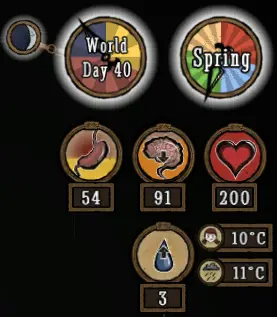
This mod enhances the HUD to display player stats and world information, such as temperature, season, and moon phase. It works with all versions of Don't Starve and Don't Starve Together.
This is a client-only mod. Only players who enable it will see the changes. It does not matter if the server has the mod installed.
The mod uses the game's internal temperature units by default. Player temperature ranges from 0 to 70. Warnings for freezing and overheating appear at 5 and 65. You can change the units to Celsius or Fahrenheit in the settings.
Configuration Options:
- Temperature: Show or hide the player's temperature. Default is Show.
- Show World Temp: Show or hide the world temperature. Default is Hide.
- Show Temp Badges: Show small icons to identify player and world temperatures. This only works if both temperatures are enabled. Default is Show.
- Temperature Unit: Choose between Game Units, Celsius, or Fahrenheit.
- Game Units: Freezing at 0, overheating at 70. Warnings occur 5 units away.
- Celsius: Freezing at 0, overheating at 35. Warnings occur 2.5 degrees away.
- Fahrenheit: Freezing at 32, overheating at 95. Warnings occur 4.5 degrees away.
- Show Waning: Show icons for waxing or waning moon phases. This option does not affect Don't Starve Together, as the base game includes this feature. Default is Show.
- Show Moon: Choose when to display the moon icon: Night only, Night and Dusk, or Always. Default is Night and Dusk.
- Predict Full Moon: Show the day of the next full moon when hovering over the moon icon. Default is Yes.
- Flip Moon: Flip the moon phase icon to match the Southern Hemisphere view. Default is No.
- Season Clock: Choose the display style: Clock (full season clock), Compact (small badge with season and day), Micro (tiny badge), or No (disabled). Default is Clock.
- Naughtiness: Show the player's naughtiness level. This does not work in Don't Starve Together unless the Insight mod is installed. Default is Show.
- Log Meter: Show the log meter for Woodie in human form. This only applies to single-player, as Don't Starve Together always shows it. Default is Always.
- Cave Clock: Always show the clock in caves. This only applies to single-player Reign of Giants. Default is Show.
- Stat Numbers: Show exact numbers for sanity, hunger, and health without hovering. Default is Always.
- Show Max Text: Show «Max:» text when hovering over stat badges to see maximum values. Default is Show.
- Show Clock Text: Show text on the Clock and Season Clock. If hidden, text appears only when hovering or using a controller. Default is Show.
- HUD Scale: Adjust the size of badges and clocks independently from the game's HUD scale. Default is 1.
Version 19.03.2024: Download