Mod «Ambient Zones (OrganicRP)» for Project Zomboid
Ambient Zones: Immersive Audio Manager
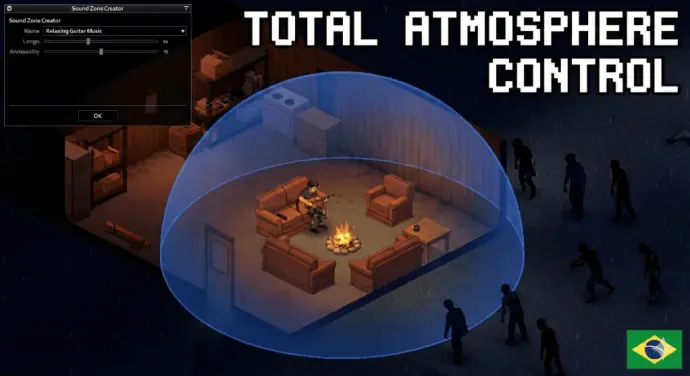
Transform your server's atmosphere with invisible areas that play custom, looping sounds when players enter. This tool is perfect for creating radiation zones, safe zones, horror events, or adding ambient music to specific locations like bars, forests, and bunkers.
Key Features
- Custom Zones: Define a rectangular area by setting two points and assign a specific sound to it.
- Smart Audio Control: Adjust volume with a slider. Sounds fade in smoothly upon entry and fade out upon exit to avoid abrupt cuts. Audio loops automatically and restarts if it ends while the player remains in the zone.
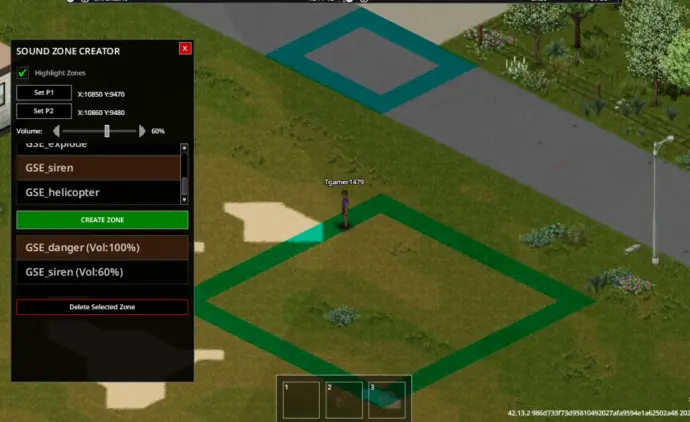
- Visual Debug Mode: Enable «Highlight Zones» to see active area borders drawn on the ground.
- Multiplayer Ready: Optimized for Build 42+ dedicated servers. The interface is exclusive to admins and moderators; regular players do not see the menu.
How to Use (Admins)
- Enter the game with Admin or Debug privileges.
- Right-click the ground and select «Sound Zone Manager».
- Mark «Set P1», walk to the opposite corner of your desired area, and mark «Set P2».
- Choose a sound from the list and adjust the volume slider.
- Click CREATE ZONE. Anyone entering this area will hear the sound.
Adding Custom Sounds To add your own music or effects, follow these steps:
- Audio File: Place your or
- .ogg
file into the- .wav
folder.- media/sound/
- Register the Sound: Create a text file (e.g., ) in
- my_sounds.txt
and add the following code:- media/scripts/
- <br>
- <br>
- <br>
1
2
3
4
5
6
7
8
9
10
11
module Base
{
sound Your_Sound_ID
{
category = Ambient,
clip
{
file = media/sound/your_audio_file.ogg,
}
}
}
- Update the UI: Open . Find the
- media/lua/client/GlobalSoundEffects_Panel.lua
list at the top and add your new ID:- GSETitles
- <br>
- <br>
- <br>
1
2
3
4
5
GSETitles = {
«GSE_danger»,
«GSE_safe»,
«Your_Sound_ID»
}
Save the file and restart the game.
Compatibility
- Game Version: Build 42+
- Mode: Singleplayer & Multiplayer
- Save Games: Safe to add to existing saves.
Technical Information
- Workshop ID: 3661236527
- Mod ID: AmbientZones
Version 20.02.2026: Download
| Tested on | |
|---|---|
| Project Zomboid | |
![[PZCh] Realism](/upload/000/u1/3/f/2623fba0.webp "[PZCh] Realism")