Mod «GhostSightB42» for Project Zomboid
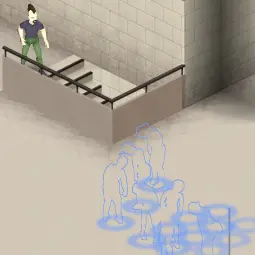
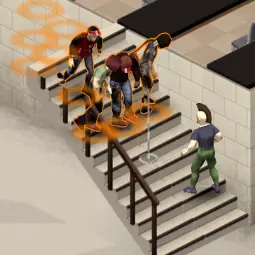
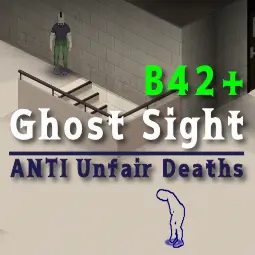
Detect and visualize zombies on other floors to prevent surprise encounters in blind spots such as stairs, ladders, or window frames.
Key Features:
- Blind Spot Detection: Sense zombies on other floors or behind buildings that are normally hidden by the game system.
- Gear-Linked FOV: Limits detection range to the player's field of view. Gas masks and helmets dynamically narrow the detection angle for realism.
- 3D Stair Scan: Accurately detects targets on stairs, landings, or different levels.
- Visual Feedback: Displays outlines for zombies in direct sight and circles for targets behind walls or floors. Note: Upper floor outlines are limited by the B42 engine.
- Floor Toggles: Option to detect other floors or include the current level. Adjust settings to maintain game balance.
Mod Options:
Customize difficulty and visuals via Mod Options (Esc -> Options -> MOD tab).
- Activation: Choose when the mod is active (Always, Aiming, Sneaking, Aiming or Sneaking, Searching).
- Radius: Set scan distance (2.0 to 50.0 tiles).
- FOV Lock: Limit scan to your front view. The angle adapts to headgear.
- Occlusion: Choose Transparent, Hybrid (Stairs focus), or Strict (Vision only).
- Max Targets: Set limit for simultaneous zombie rendering (10 to 500).
- Sensitivity: Adjust detection response to zombie noise or movement.
- Style: Toggle between Circles, Outlines, or Both.
- Circle Scale: Adjust the size of floor markers.
- Z-Range: Set vertical scan depth (up to 10 floors).
- Toggles: Hide same-floor targets, show visual targets, or toggle jitter.
- Colors: Customize color and opacity for each floor level.
Multiplayer Support:
- Server Sync: Targets tracked by other players are correctly included in your view.
- Lag Info: Minor delays or desync may occur due to server load or lag.
- Admin Controls: Admins can cap radius and targets via Sandbox Options.
Precautions:
- Balance: High radius reduces tension. Balanced settings are recommended.
- Reset: The «Reset to Default» button excludes color settings to prevent B42 engine crashes.
- B42 Limits: Outlines work for vision and lower floors; upper floors are limited to circle markers.
Customization:
Change the circle design by replacing media/textures/GS_Circle.png with a custom image (256x256px PNG, transparent, no metadata recommended).
Technical Information:
- Workshop ID: 3722530128
- Mod ID: GhostSightB42
Version 16.05.2026: Download
| Tested on | |
|---|---|
| Project Zomboid | |
![[PZCh] Realism](/upload/000/u1/3/f/2623fba0.webp "[PZCh] Realism")