Mod «Mini Health Plus» for Project Zomboid
Mini Health Plus is a modernized and expanded rework of the original Mini Health Panel, designed to provide a clean and always-accessible overview of your character’s condition without constantly opening the vanilla health panel.
This version features significant interface, usability, and feature improvements, including:
- Scalable UI with HD textures.
- Always-on-top option for better visibility.
- Replace Bandage support directly from the Mini Health interface.
- Improved drag and drop behavior for easier positioning.
- Improved detached settings window for configuration.
- Soft pulse injury animation instead of harsh fast blinking, with adjustable speed and live preview.
- Improved wound logic, including better handling for splints, healed treated injuries, and stitched wound states.
- Muscle strain indicators that change color from orange to red depending on severity. The silhouette can briefly reveal itself when a strain threshold is reached if auto-hide is enabled.
- Multi-language support.
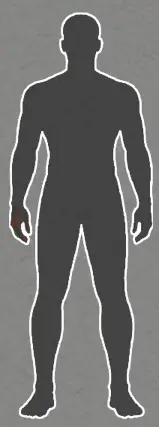
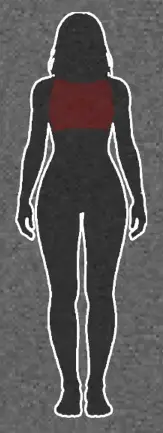
Mini Health Plus provides a permanent overview of your character’s wounds in a compact and minimalistic display. The silhouette can stay visible at all times or hide itself when there is nothing that needs attention, depending on your settings.
Color Indicators:
- Pulsing red: Body part still needs treatment.
- White: Wound is currently bandaged or splinted.
- Sky blue: Bandaged or splinted body part appears fully healed; treatment can likely be removed safely.
- Orange: Bandage is dirty and should be replaced.
- Purple: Stitched wound has likely reached the point where it is worth checking and removing stitches. In most cases, only a scratch may remain afterward.
- Pulsing while bandaged: Usually means the wound is not fully treated yet (e.g., lodged glass, deep wound, stitching still needed).
Built-in Settings:
- Always on top
- Always visible
- Health bar
- Muscle strain display
- Window lock
- Hover background
- Animation speed
Controls:
- Left click: Opens the vanilla health panel.
- Right click: Opens the Mini Health context menu with available treatment actions and settings.
- Drag and move: Position the panel anywhere on your screen.
Technical Information:
- Workshop ID: 3710913197
- Mod ID: MiniHealthPlus


| Tested on | |
|---|---|
| Project Zomboid | |
![[PZCh] Realism](/upload/000/u1/3/f/2623fba0.webp "[PZCh] Realism")